> ## Documentation Index
> Fetch the complete documentation index at: https://docs.makeswift.com/llms.txt
> Use this file to discover all available pages before exploring further.
# Number
> Adds a Number input in the Makeswift builder to visually edit a `number` prop.
## Params
Text for the panel label in the Makeswift builder.
The description shown in the Panel of the Makeswift builder. This can be written in Markdown format.
Added in [`v0.24.8`](https://github.com/makeswift/makeswift/releases/tag/%40makeswift%2Fruntime%400.24.8).
Orientation of the number label within the panel.
The value passed to your component when nothing is set in the Makeswift
builder.
The smallest number that can be set in the panel input.
The largest number that can be set in the panel input.
The increment amount when using the ↑ ↓ arrows or dragging the panel input.
Decorative text appended to the end of the panel input.
## Prop type
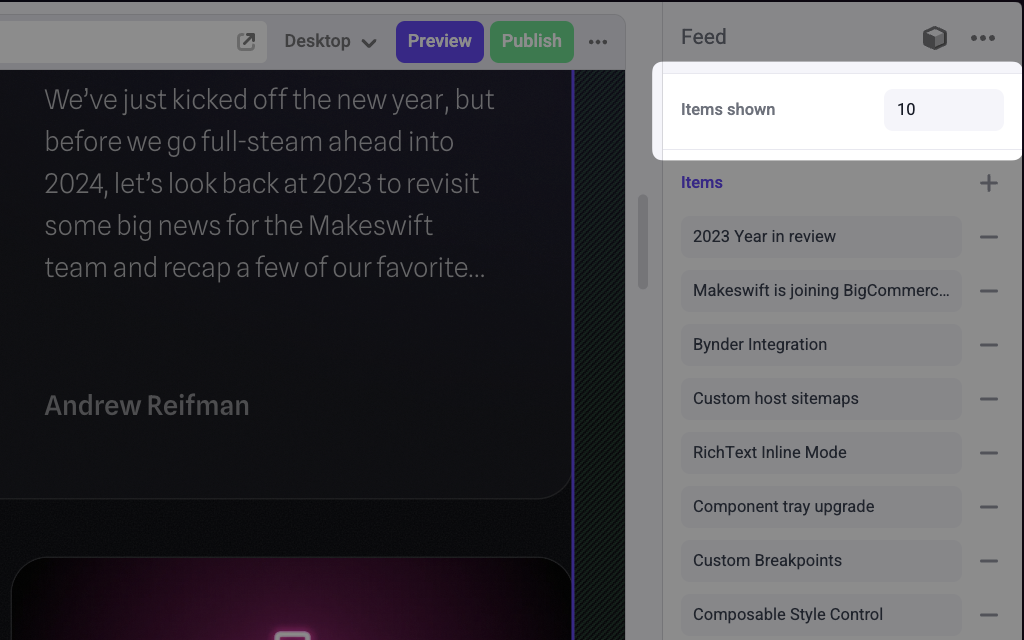
The Number control passes a `number` to your component. If you don't set a `defaultValue` and no value is set in the builder, your component receives `undefined`.
## Example
```tsx Feed.makeswift.ts theme={null}
import { Number } from "@makeswift/runtime/controls";
import { runtime } from "@/makeswift/runtime";
import { Feed } from "./Feed";
runtime.registerComponent(Feed, {
type: "feed",
label: "Feed",
props: {
itemsShown: Number({
label: "Items shown",
defaultValue: 10,
min: 0,
max: 100,
}),
},
});
```
```tsx Feed.tsx theme={null}
const items = [
{ id: "1", name: "item 1" },
{ id: "2", name: "item 2" },
{ id: "3", name: "item 3" },
{ id: "4", name: "item 4" },
];
interface Props {
itemsShown?: number;
}
export function Feed({ itemsShown = 10 }: Props) {
return (
{items.slice(0, itemsShown).map((item) => (
{item.name}
))}
);
}
```
`.makeswift.ts` is a naming convention for organizing Makeswift registration
code. [Learn
more](/developer/reference/runtime/register-component#organizing-registration-code).
 ## Params