> ## Documentation Index
> Fetch the complete documentation index at: https://docs.makeswift.com/llms.txt
> Use this file to discover all available pages before exploring further.

# Shape

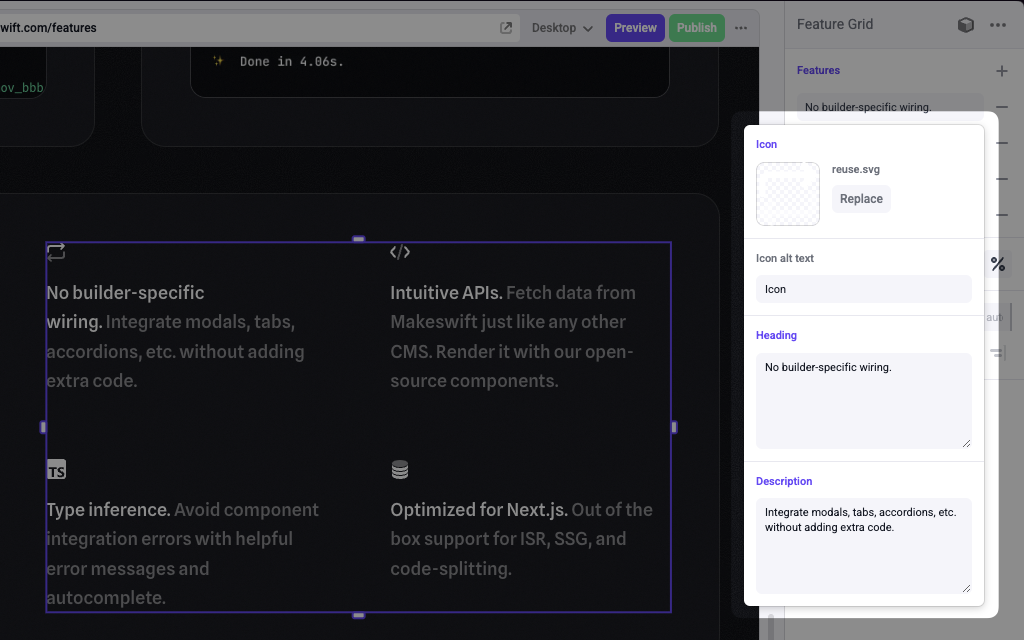
> Adds a Shape panel in the Makeswift builder to visually edit an `object`.

<Frame type="glass" caption="A shape panel for a tab in a Tabs component">
  <img src="https://mintcdn.com/makeswift/cdz9WIAi676OTSsF/images/shape-panel.png?fit=max&auto=format&n=cdz9WIAi676OTSsF&q=85&s=c2b37e85d482f8f0f20496b3eaf3d10e" width="1024" height="640" data-path="images/shape-panel.png" />
</Frame>

The Shape control can be nested as deeply as you want within Shape and List controls.

## Params

<ParamField query="type" type="{ [key: string]: Control }" required>
  An object of controls in which the type and values returned from each control
  determines the shape of the overall value passed to your component. May
  consist of any of the Makeswift controls.
</ParamField>

## Prop type

The Shape control passes an `object` based on the controls used in the `type` field. The keys of the object are the keys of the controls in the `type` field, and the values are based on the corresponding control's prop type.

## Example

This example adds a Shape control to the `type` field of a [List](/developer/reference/controls/list) control for a Feature Grid component.

<CodeGroup>
  ```tsx FeatureGrid.makeswift.ts theme={null}
  import {
    List,
    Shape,
    TextInput,
    TextArea,
    Image,
  } from "@makeswift/runtime/controls"

  import { runtime } from "@/makeswift/runtime"

  import { FeatureGrid } from "./FeatureGrid"

  runtime.registerComponent(FeatureGrid, {
    type: "feature-grid",
    label: "Feature Grid",
    props: {
      features: List({
        label: "Features",
        type: Shape({
          type: {
            icon: Image({ label: "Icon" }),
            iconAltText: TextInput({
              label: "Icon alt text",
              defaultValue: "icon",
            }),
            heading: TextArea({
              label: "Heading",
              defaultValue: "This is a heading",
            }),
            description: TextArea({
              label: "Description",
              defaultValue: "This is a description.",
            }),
          },
        }),
      }),
    },
  })
  ```

  ```tsx FeatureGrid.tsx theme={null}
  interface Props {
    features: {
      icon: string
      iconAltText: string
      heading: string
      description: string
    }[]
  }

  export function FeatureGrid({ features }: Props) {
    return (
      <div className="grid grid-cols-2 gap-4">
        {features.map((feature, index) => (
          <div className="col-span-1 grid gap-2" key={index}>
            <img src={feature.icon} alt={feature.iconAltText} />
            <h3>{feature.heading}</h3>
            <p>{feature.description}</p>
          </div>
        ))}
      </div>
    )
  }
  ```
</CodeGroup>

<Info>
  `.makeswift.ts` is a naming convention for organizing Makeswift registration
  code. [Learn
  more](/developer/reference/runtime/register-component#organizing-registration-code).
</Info>