> ## Documentation Index
> Fetch the complete documentation index at: https://docs.makeswift.com/llms.txt
> Use this file to discover all available pages before exploring further.

# registerComponent

> Adds your components to the Makeswift builder.

export const IconList = () => {
  const icons = [{
    name: "billing",
    icon: <svg xmlns="http://www.w3.org/2000/svg" width={20} height={20} className="fill-[#9498A3]">
              <path fillRule="evenodd" d="M2 4a2 2 0 0 0-2 2h20a2 2 0 0 0-2-2H2Zm18 4H0v6a2 2 0 0 0 2 2h16a2 2 0 0 0 2-2V8Zm-2 4a2.5 2.5 0 1 1-5 0 2.5 2.5 0 0 1 5 0Zm-8 1a1 1 0 1 0 0-2H8a1 1 0 1 0 0 2h2Zm-4-1a1 1 0 0 1-1 1H3a1 1 0 1 1 0-2h2a1 1 0 0 1 1 1Z" clipRule="evenodd" />
              <path d="M0 6h20v2H0V6ZM18 12a2.5 2.5 0 1 1-5 0 2.5 2.5 0 0 1 5 0Z" opacity={0.25} />
              <path fillRule="evenodd" d="M11 12a1 1 0 0 1-1 1H8a1 1 0 1 1 0-2h2a1 1 0 0 1 1 1ZM6 12a1 1 0 0 1-1 1H3a1 1 0 1 1 0-2h2a1 1 0 0 1 1 1Z" clipRule="evenodd" opacity={0.25} />
            </svg>
  }, {
    name: "bolt",
    icon: <svg xmlns="http://www.w3.org/2000/svg" width={20} height={20} className="fill-[#9498A3]">
          <path d="M4.172 10.368 6.9.368A.5.5 0 0 1 7.382 0h7.684a.5.5 0 0 1 .416.777L12 6h4.5a.5.5 0 0 1 .4.8l-9.75 13a.5.5 0 0 1-.4.2h-.092a.5.5 0 0 1-.482-.634L8.5 11H4.655a.5.5 0 0 1-.483-.632Z" />
        </svg>
  }, {
    name: 'button',
    icon: <svg xmlns="http://www.w3.org/2000/svg" width={20} height={20} className="fill-[#9498A3]">
          <path d="M4.5 2a4.5 4.5 0 0 0 0 9H8V7.966c0-1.248 1.508-1.872 2.39-.99L14.414 11H15.5a4.5 4.5 0 1 0 0-9h-11z" />
          <path d="M9 7.966v8.068a.4.4 0 0 0 .683.283l1.638-1.638 1.486 3.607a.75.75 0 1 0 1.386-.572L12.665 14h2.37a.4.4 0 0 0 .283-.683L9.683 7.683A.4.4 0 0 0 9 7.966z" opacity={0.5} />
        </svg>
  }, {
    name: 'carousel',
    icon: <svg xmlns="http://www.w3.org/2000/svg" width={20} height={20} className="fill-[#9498A3]">
          <rect width={12} height={16} x={4} y={2} rx={2} />
          <path d="M0 4h1.5A1.5 1.5 0 0 1 3 5.5v9A1.5 1.5 0 0 1 1.5 16H0V4Zm20 12h-1.5a1.5 1.5 0 0 1-1.5-1.5v-9A1.5 1.5 0 0 1 18.5 4H20v12Z" opacity={0.5} />
        </svg>
  }, {
    name: 'chats',
    icon: <svg xmlns="http://www.w3.org/2000/svg" width={20} height={20} className="fill-[#9498A3]">
            <path fillRule="evenodd" d="M6.962 16H11l4.77 3.975a.75.75 0 0 0 1.23-.576V16a3 3 0 0 0 3-3V6a3.001 3.001 0 0 0-2-2.83V10a4 4 0 0 1-4 4H9.362l-2.4 2Z" clipRule="evenodd" opacity={0.5} />
            <path d="M0 10V3a3 3 0 0 1 3-3h11a3 3 0 0 1 3 3v7a3 3 0 0 1-3 3H9l-4.77 3.975A.75.75 0 0 1 3 16.399V13a3 3 0 0 1-3-3Z" />
          </svg>
  }, {
    name: 'code',
    icon: <svg xmlns="http://www.w3.org/2000/svg" width={20} height={20} className="fill-[#9498A3]">
              <path fillRule="evenodd" d="M5.78 5.625a1 1 0 1 0-1.56-1.25l-4 5a1 1 0 0 0 0 1.25l4 5a1 1 0 1 0 1.56-1.25L2.28 10l3.5-4.375Zm8.44 0a1 1 0 1 1 1.56-1.25l4 5a1 1 0 0 1 0 1.25l-4 5a1 1 0 1 1-1.56-1.25L17.72 10l-3.5-4.375Z" clipRule="evenodd" />
              <path fillRule="evenodd" d="M12.275 2.038a1 1 0 0 1 .686 1.237l-4 14a1 1 0 1 1-1.923-.55l4-14a1 1 0 0 1 1.237-.687Z" clipRule="evenodd" opacity={0.5} />
            </svg>
  }, {
    name: 'countdown',
    icon: <svg xmlns="http://www.w3.org/2000/svg" width={20} height={20} className="fill-[#9498A3]">
            <path fillRule="evenodd" d="M0 3a3 3 0 0 1 3-3h14a3 3 0 0 1 3 3v14a3 3 0 0 1-3 3H3a3 3 0 0 1-3-3V3Zm15.493 1.13A1 1 0 0 1 16 5v10a1 1 0 1 1-2 0V6.766l-.985.591a1 1 0 0 1-1.03-1.715l2.5-1.5a1 1 0 0 1 1.008-.012ZM7 4a3 3 0 0 0-3 3v6a3 3 0 1 0 6 0V7a3 3 0 0 0-3-3ZM6 7a1 1 0 0 1 2 0v6a1 1 0 1 1-2 0V7Z" clipRule="evenodd" />
          </svg>
  }, {
    name: 'cube',
    icon: <svg xmlns="http://www.w3.org/2000/svg" width={20} height={20} className="fill-[#9498A3]">
            <path d="m10 9 9-4v10l-9 4V9Z" opacity={0.5} />
            <path fillRule="evenodd" d="M11.625.355a3.897 3.897 0 0 0-3.25 0L1.782 3.37C.698 3.866 0 4.97 0 6.192v7.616c0 1.22.698 2.326 1.782 2.821l6.593 3.016a3.896 3.896 0 0 0 3.25 0l6.593-3.016c1.084-.495 1.782-1.6 1.782-2.821V6.192c0-1.22-.698-2.326-1.782-2.821L11.625.355Zm-2.437 1.88a1.948 1.948 0 0 1 1.624 0l6.594 3.017c.361.165.594.533.594.94v7.616c0 .407-.233.775-.594.94l-6.594 3.016a1.953 1.953 0 0 1-.812.178V9L2.223 5.544c.098-.124.224-.225.37-.292l6.595-3.016Z" clipRule="evenodd" />
          </svg>
  }, {
    name: 'database',
    icon: <svg xmlns="http://www.w3.org/2000/svg" width={20} height={20} className="fill-[#9498A3]">
            <path fillRule="evenodd" d="M18 5.5C18 7.433 14.418 9 10 9S2 7.433 2 5.5v3c0 1.933 3.582 3.5 8 3.5s8-1.567 8-3.5v-3ZM10 13c4.418 0 8-1.567 8-3.5v3c0 1.933-3.582 3.5-8 3.5s-8-1.567-8-3.5v-3c0 1.933 3.582 3.5 8 3.5Zm0 4c4.418 0 8-1.567 8-3.5v3c0 1.933-3.582 3.5-8 3.5s-8-1.567-8-3.5v-3c0 1.933 3.582 3.5 8 3.5Z" clipRule="evenodd" />
            <ellipse cx={10} cy={4.5} opacity={0.4} rx={8} ry={3.5} />
          </svg>
  }, {
    name: 'divider',
    icon: <svg xmlns="http://www.w3.org/2000/svg" width={20} height={20} className="fill-[#9498A3]">
            <path fillRule="evenodd" d="M18 4.5V0H2v4.5A1.5 1.5 0 0 0 3.5 6h13A1.5 1.5 0 0 0 18 4.5Zm-16 11V20h16v-4.5a1.5 1.5 0 0 0-1.5-1.5h-13A1.5 1.5 0 0 0 2 15.5Z" clipRule="evenodd" opacity={0.25} />
            <rect width={20} height={2} y={9} rx={1} />
          </svg>
  }, {
    name: 'form',
    icon: <svg xmlns="http://www.w3.org/2000/svg" width={20} height={20} className="fill-[#9498A3]">
            <rect width={2} height={12} opacity={0.5} rx={1} transform="matrix(1 0 0 -1 4 16)" />
            <path fillRule="evenodd" d="M0 4a4 4 0 0 1 4-4h12a4 4 0 0 1 4 4v12a4 4 0 0 1-4 4H4a4 4 0 0 1-4-4V4Zm4-2a2 2 0 0 0-2 2v12a2 2 0 0 0 2 2h12a2 2 0 0 0 2-2V4a2 2 0 0 0-2-2H4Z" clipRule="evenodd" />
          </svg>
  }, {
    name: 'gallery',
    icon: <svg xmlns="http://www.w3.org/2000/svg" width={20} height={20} className="fill-[#9498A3]">
              <path fillRule="evenodd" d="M3 6a3 3 0 0 0-3 3v8a3 3 0 0 0 3 3h14a3 3 0 0 0 3-3V9a3 3 0 0 0-3-3H3ZM2 9a1 1 0 0 1 1-1h14a1 1 0 0 1 1 1v5.4l-2.52-2.772a2 2 0 0 0-2.96 0l-3.41 3.751a1.5 1.5 0 0 1-2.22 0l-.41-.451a2 2 0 0 0-2.96 0L2 16.6V9Z" clipRule="evenodd" />
              <circle cx={7} cy={11} r={2} opacity={0.4} />
              <path fillRule="evenodd" d="M5 0a2 2 0 0 0-2 2h14a2 2 0 0 0-2-2H5ZM3 3a2 2 0 0 0-2 2h18a2 2 0 0 0-2-2H3Z" clipRule="evenodd" opacity={0.4} />
            </svg>
  }, {
    name: 'help',
    icon: <svg xmlns="http://www.w3.org/2000/svg" width={20} height={20} className="fill-[#9498A3]">
              <path fillRule="evenodd" d="M10 20c5.523 0 10-4.477 10-10S15.523 0 10 0 0 4.477 0 10s4.477 10 10 10ZM8 7a2 2 0 0 1 2-2h.219a1.781 1.781 0 0 1 .796 3.374l-.357.179A3 3 0 0 0 9 11.236V12a1 1 0 1 0 2 0v-.764a1 1 0 0 1 .553-.894l.357-.179A3.781 3.781 0 0 0 10.219 3H10a4 4 0 0 0-4 4 1 1 0 0 0 2 0Zm.75 8.75a1.25 1.25 0 1 1 2.5 0 1.25 1.25 0 0 1-2.5 0Z" clipRule="evenodd" />
           </svg>
  }, {
    name: 'image',
    icon: <svg xmlns="http://www.w3.org/2000/svg" width={20} height={20} className="fill-[#9498A3]">
                <path fillRule="evenodd" d="M5 0a5 5 0 0 0-5 5v10a5 5 0 0 0 5 5h10a5 5 0 0 0 5-5V5a5 5 0 0 0-5-5H5zM2 5a3 3 0 0 1 3-3h10a3 3 0 0 1 3 3v6.364l-2.641-3.362a3 3 0 0 0-4.718 0l-3.64 4.632a3 3 0 0 1-4.717 0L2 12.273V5z" clipRule="evenodd" />
                <path d="M9 6.5a2.5 2.5 0 1 1-5 0 2.5 2.5 0 0 1 5 0z" opacity={0.5} />
              </svg>
  }, {
    name: 'layout',
    icon: <svg xmlns="http://www.w3.org/2000/svg" width={20} height={20} className="fill-[#9498A3]">
              <path fillRule="evenodd" d="M3 0a3 3 0 0 0-3 3v7a3 3 0 0 0 3 3h14a3 3 0 0 0 3-3V3a3 3 0 0 0-3-3H3zM2 3a1 1 0 0 1 1-1h14a1 1 0 0 1 1 1v5l-2.586-2.586a2 2 0 0 0-2.828 0L9.06 8.94a1.5 1.5 0 0 1-2.122 0l-.525-.525a2 2 0 0 0-2.828 0L2 10V3z" clipRule="evenodd" />
              <circle cx={7} cy={5} r={2} opacity={0.5} />
              <path fillRule="evenodd" d="M11 15.5a.5.5 0 0 1 .5-.5h8a.5.5 0 0 1 0 1h-8a.5.5 0 0 1-.5-.5zm0 2a.5.5 0 0 1 .5-.5h8a.5.5 0 0 1 0 1h-8a.5.5 0 0 1-.5-.5zm.5 1.5a.5.5 0 0 0 0 1h8a.5.5 0 0 0 0-1h-8z" clipRule="evenodd" opacity={0.4} />
              <rect width={9} height={5} y={15} rx={1.5} />
            </svg>
  }, {
    name: 'lock',
    icon: <svg xmlns="http://www.w3.org/2000/svg" width={20} height={20} className="fill-[#9498A3]">
              <path fillRule="evenodd" d="M10 2a4 4 0 0 0-4 4v4H4V6a6 6 0 1 1 12 0v4h-2V6a4 4 0 0 0-4-4Z" clipRule="evenodd" opacity={0.5} />
              <path fillRule="evenodd" d="M4 9a2 2 0 0 0-2 2v7a2 2 0 0 0 2 2h12a2 2 0 0 0 2-2v-7a2 2 0 0 0-2-2H4Zm8 4a2 2 0 0 1-1 1.732V17a1 1 0 1 1-2 0v-2.268A2 2 0 0 1 10 11a2 2 0 0 1 2 2Z" clipRule="evenodd" />
            </svg>
  }, {
    name: 'navigation',
    icon: <svg xmlns="http://www.w3.org/2000/svg" width={20} height={20} className="fill-[#9498A3]">
                <rect width={20} height={2} y={3} rx={1} />
                <rect width={16} height={2} y={9} opacity={0.5} rx={1} />
                <rect width={20} height={2} y={15} rx={1} />
              </svg>
  }, {
    name: 'social-links',
    icon: <svg xmlns="http://www.w3.org/2000/svg" width={20} height={20} className="fill-[#9498A3]">
                <path fillRule="evenodd" d="M2.404 9.483a8.01 8.01 0 0 1 6.372-5.39A4.502 4.502 0 0 0 0 5.5a4.5 4.5 0 0 0 2.404 3.983Zm15.192 0a4.5 4.5 0 1 0-6.372-5.39 8.01 8.01 0 0 1 6.372 5.39Z" clipRule="evenodd" opacity={0.5} />
                <path fillRule="evenodd" d="M17 12a6.974 6.974 0 0 1-1.782 4.666A6.982 6.982 0 0 1 10 19a6.983 6.983 0 0 1-5.218-2.334A7 7 0 1 1 17 12Zm-2.39 3.841A6.11 6.11 0 0 0 10 13.75a6.11 6.11 0 0 0-4.61 2.091A5.987 5.987 0 0 0 10 18c1.852 0 3.509-.84 4.61-2.159ZM10 12.625a2.5 2.5 0 1 0 0-5 2.5 2.5 0 0 0 0 5Z" clipRule="evenodd" />
              </svg>
  }, {
    name: 'star',
    icon: <svg xmlns="http://www.w3.org/2000/svg" width={20} height={20} className="fill-[#9498A3]">
              <path d="M9.536.655a.5.5 0 0 1 .928 0l2.264 5.638a.5.5 0 0 0 .43.313l6.061.41a.5.5 0 0 1 .287.883l-4.662 3.895a.5.5 0 0 0-.164.506l1.482 5.892a.5.5 0 0 1-.75.545l-5.146-3.23a.5.5 0 0 0-.532 0l-5.145 3.23a.5.5 0 0 1-.75-.545L5.32 12.3a.5.5 0 0 0-.164-.506L.494 7.9a.5.5 0 0 1 .287-.882l6.06-.411a.5.5 0 0 0 .431-.313L9.536.655Z" />
            </svg>
  }, {
    name: 'text',
    icon: <svg xmlns="http://www.w3.org/2000/svg" width={20} height={20} className="fill-[#9498A3]">
              <path d="M3 7a1 1 0 0 0 1-1V4h5v12H8a1 1 0 0 0 0 2h4a1 1 0 1 0 0-2h-1V4h5v2a1 1 0 0 0 2 0V3a1 1 0 0 0-1-1H3a1 1 0 0 0-1 1v3a1 1 0 0 0 1 1z" />
            </svg>
  }, {
    name: 'users',
    icon: <svg xmlns="http://www.w3.org/2000/svg" width={20} height={20} className="fill-[#9498A3]">
              <path fillRule="evenodd" d="M10.667 7.109A4.48 4.48 0 0 0 11.5 4.5a4.48 4.48 0 0 0-.833-2.609 3.5 3.5 0 1 1 0 5.218ZM14.345 18A2.789 2.789 0 0 0 15 16.2V16a7.994 7.994 0 0 0-3.75-6.78A7 7 0 0 1 20 16v.2a1.8 1.8 0 0 1-1.8 1.8h-3.855Z" clipRule="evenodd" opacity={0.4} />
              <path fillRule="evenodd" d="M7 8a3.5 3.5 0 1 0 0-7 3.5 3.5 0 0 0 0 7Zm0 1a7 7 0 0 0-7 7v.2A1.8 1.8 0 0 0 1.8 18h10.4a1.8 1.8 0 0 0 1.8-1.8V16a7 7 0 0 0-7-7Z" clipRule="evenodd" />
            </svg>
  }, {
    name: 'video',
    icon: <svg xmlns="http://www.w3.org/2000/svg" width={20} height={20} className="fill-[#9498A3]">
            <path fillRule="evenodd" d="M10 20c5.523 0 10-4.477 10-10S15.523 0 10 0 0 4.477 0 10s4.477 10 10 10ZM8.486 5.825A1 1 0 0 0 7 6.7v6.6a1 1 0 0 0 1.486.875l5.94-3.3a1 1 0 0 0 0-1.75l-5.94-3.3Z" clipRule="evenodd" />
          </svg>
  }];
  return <CardGroup cols={4}>
  {icons.map(icon => <div className="py-2">
      <div className="bg-gray-100 flex flex-col gap-y-2 items-center justify-center rounded-lg p-3 h-32 ">
        {icon.icon}
        <p className="m-0 text-gray-800">{icon.name}</p>
      </div>
    </div>)}
</CardGroup>;
};

## Arguments

1. <ParamField query="component" type="Component" required>
     Your component to be registered. This can be a React component or a function.
   </ParamField>
2. <ParamField query="options" type="object" required>
     <p>Options for site version and locale.</p>

     <Expandable>
       <ParamField query="type" type="string" required>
         <p>A unique string that identifies the component for Makeswift to
         render. Don't change the type once you use the component in
         the Makeswift builder.</p>

         <Warning>If this value changes after you use the component in the Makeswift builder, the component will appear as a "Component not found" block. To fix this, restore the `type` to the original value, or delete this component and re-add add it to the page.</Warning>
       </ParamField>

       <ParamField query="label" type="string" required>
         The label shown in the Makeswift builder.
       </ParamField>

       <ParamField query="description" type="string">
         The description shown in the Panel of the Makeswift builder. This can be written in Markdown format.
         Added in [`v0.24.8`](https://github.com/makeswift/makeswift/releases/tag/%40makeswift%2Fruntime%400.24.8).
       </ParamField>

       <ParamField query="icon" type="Icon">
         The icon shown in the Makeswift builder. You can find all available icons in the [icons list](#icons-list) section.
       </ParamField>

       <ParamField query="hidden" type="boolean">
         A boolean that determines whether or not this component will be displayed in the Component Tray.
       </ParamField>

       <ParamField query="builtinSuspense" type="boolean">
         A boolean that determines whether or not this component will be wrapped in a built-in `<Suspense>` boundary.
         Defaults to `true`. Set this to `false` if your component already includes its own `<Suspense>` boundary.

         Added in [`v0.26.0`](https://github.com/makeswift/makeswift/releases/tag/%40makeswift%2Fruntime%400.26.0).
       </ParamField>

       <ParamField query="props" type="Record<string, Control>" required>
         An object mapping prop names to Makeswift [controls](/developer/concepts#controls).
       </ParamField>
     </Expandable>
   </ParamField>

## Examples

### Registering a box

This example shows how to register a `Box` component. `'box'` is the value for `type`, which must
be unique, as Makeswift uses this value to identify the component. This value shouldn't change once you use the
component in the Makeswift builder. `'Box'` is the `label`, which appears in
the Makeswift builder. The example applies a [`Style`](/developer/reference/controls/style) control to the
`className` prop.

```tsx makeswift/components.tsx theme={null}
import { Style } from "@makeswift/runtime/controls";

import { runtime } from "./runtime";

function Box({ className }) {
  return <div className={className}>I'm a box!</div>;
}

runtime.registerComponent(Box, {
  type: "box",
  label: "Box",
  props: {
    className: Style({ properties: Style.All }),
  },
});
```

### Creating sections

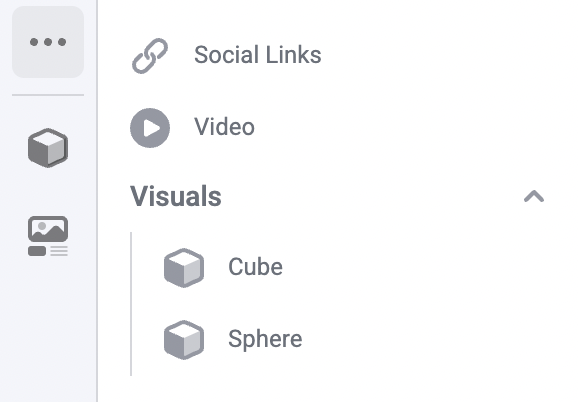
This example shows how to register a `Cube` and a `Sphere` component under a "Visuals" section. In each
components' `label`, use slashes to separate the section name and component name. In the Makeswift
builder, both components appear under the same Visuals collapsible section:

<Frame>
  <img src="https://mintcdn.com/makeswift/ttFYL1GC4O0eQWyS/images/registered-component-sections.png?fit=max&auto=format&n=ttFYL1GC4O0eQWyS&q=85&s=33482e0d85425b2698c79611bab19aea" alt="Screenshot of registered component sections" width="578" height="402" data-path="images/registered-component-sections.png" />
</Frame>

```tsx makeswift/components.tsx theme={null}
import { Style } from "@makeswift/runtime/controls";

function Cube({ className }) {
  return <div className={className}>Cube!</div>;
}

function Sphere({ className }) {
  return <div className={className}>Sphere!</div>;
}

runtime.registerComponent(Cube, {
  type: "cube",
  label: "Visuals/Cube",
  props: {
    className: Style({ properties: Style.All }),
  },
});

runtime.registerComponent(Sphere, {
  type: "sphere",
  label: "Visuals/Sphere",
  props: {
    className: Style({ properties: Style.All }),
  },
});
```

### Overriding the built-in Suspense boundary

By default, the Makeswift runtime wraps registered components in a built-in `<Suspense>` boundary to
transparently enable efficient server-side streaming and asynchronous data fetching. If your component
already includes its own `<Suspense>` boundary, you can disable the built-in one by setting the
`builtinSuspense` option to `false`:

```tsx theme={null}
import { TextInput } from "@makeswift/runtime/controls";
import { runtime } from "./runtime";

function Discography({ artistId }: { artistId?: string }) {
  return (
    <>
      <h2>Discography</h2>
      {/* component's own Suspense boundary with a fallback */}
      <Suspense fallback={<div>Loading...</div>}>
        <AlbumList artistId={artistId} />
      </Suspense>
    </>
  );
}

runtime.registerComponent(Discography, {
  type: 'section-discography',
  label: 'Discography',
  builtinSuspense: false, // disable the built-in Suspense boundary
  props: {
    artistId: TextInput({ label: 'Artist ID' }),
  },
});
```

### Adding custom icons

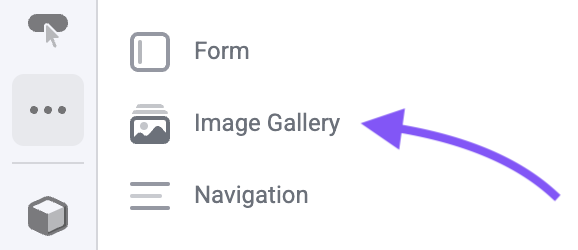
This example shows how to register an `ImageGallery` component with a custom icon. We
import `ComponentIcon` from `@makeswift/runtime` and pass
`ComponentIcon.Gallery` as the `icon` for our component.

<Note>
  You can find all available icons in the [icons list](#icons-list) section.
</Note>

In the builder
component tray, we can see our component with the selected icon.

<Frame>
  <img src="https://mintcdn.com/makeswift/ttFYL1GC4O0eQWyS/images/register-custom-icon.png?fit=max&auto=format&n=ttFYL1GC4O0eQWyS&q=85&s=a9a863e98f7ce0cb6c161384723ff35b" alt="Screenshot of registered component icons" width="578" height="250" data-path="images/register-custom-icon.png" />
</Frame>

```tsx makeswift/components.tsx theme={null}
import { Style } from "@makeswift/runtime/controls";
import { ComponentIcon } from "@makeswift/runtime";

import { runtime } from "./runtime";

function ImageGallery({ className }) {
  return <div className={className}>I'm an image gallery!</div>;
}

runtime.registerComponent(Cube, {
  type: "image-galley",
  label: "ImageGallery",
  icon: ComponentIcon.Gallery,
  props: {
    className: Style({ properties: Style.All }),
  },
});
```

### Adding a description

This example shows how to add a `Circle` component with a rich description. We
can define a description string using markdown formatting, and pass it into the component description field.

```typescript theme={null}
const mdDescription = `
# This is a larger heading

This is some text at the top of here

[![robot](https://plus.unsplash.com/premium_photo-1738614647383-0435fcb26a55?w=500&auto=format&fit=crop&q=60&ixlib=rb-4.1.0&ixid=M3wxMjA3fDB8MHxleHBsb3JlLWZlZWR8NHx8fGVufDB8fHx8fA%3D%3D)](https://www.youtube.com/watch?v=dQw4w9WgXcQ)

## This is a smaller heading

This is a **description** about this component, click to [learn more](https://www.youtube.com/watch?v=dQw4w9WgXcQ).
* First Item
* Second item

This is a line with some \`\`<code/>\`\`
`
```

```tsx makeswift/components.tsx theme={null}
import { Style } from "@makeswift/runtime/controls";

import { runtime } from "@/makeswift/runtime";

function Circle({ className }) {
  return <div className={className}>I'm a circle!</div>;
}

runtime.registerComponent(Circle, {
  type: "circle-tester",
  label: "Custom / Circle",
  icon: "chats",
  hidden: false,
  description: mdDescription,
  props: {
    className: Style({ properties: Style.All }),
  },
});
```

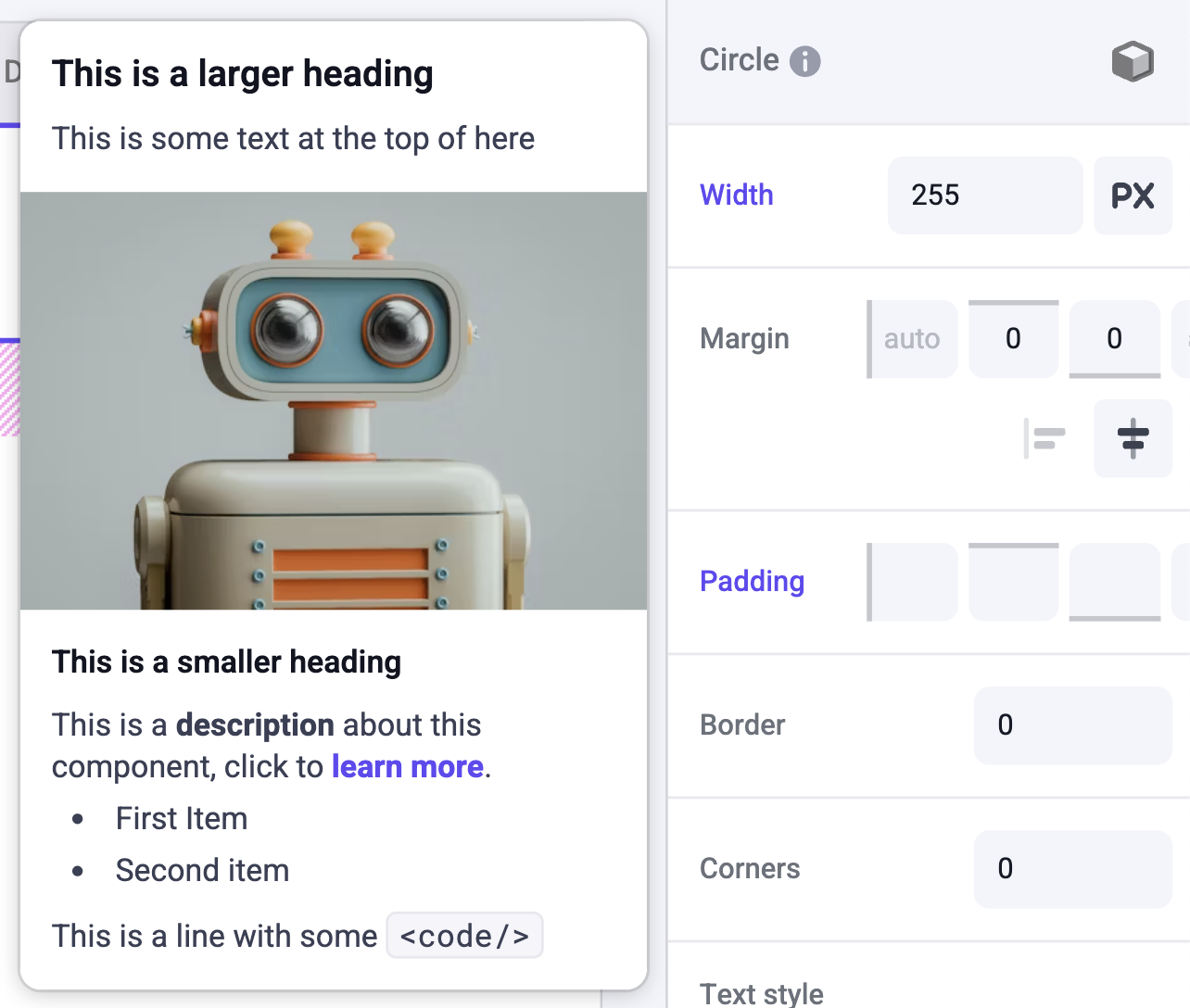
In the Properties Sidebar, we can see an info icon next to the component label. Hover over the label to open the description tooltip.

<Frame>
  <img src="https://mintcdn.com/makeswift/AOijlpVp0npNQ8wB/images/developer/reference/register-component/register-custom-description.png?fit=max&auto=format&n=AOijlpVp0npNQ8wB&q=85&s=7b2d4bb052758045ddd6f89e517511c3" alt="custom component description open" width="1284" height="1088" data-path="images/developer/reference/register-component/register-custom-description.png" />
</Frame>

Descriptions that are longer than the standard tooltip will have a scrollbar to view the overflowing content.

### Organizing registration code

As you register more components in `makeswift/components.tsx`, you may notice this file growing rather large. To keep your codebase organized, we recommend breaking out your Makeswift registration code into separate files and co-locating it with your component file.

For example, if you have a `Box` component, you can create a `Box.makeswift.ts` file next to your `Box.tsx` file. This file will contain the registration code for the `Box` component.

<Info>
  Makeswift does **not** rely on this naming convention. Feel free to use
  whatever naming convention you prefer.
</Info>

<CodeGroup>
  ```tsx components/Box/Box.tsx theme={null}
  interface Props {
    className?: string;
  }

  function Box({ className }) {
    return <div className={className}>I'm a box!</div>;
  }
  ```

  ```tsx components/Box/Box.makeswift.ts theme={null}
  import { Style } from "@makeswift/runtime/controls";

  import { runtime } from "@/makeswift/runtime";

  import { Box } from "./Box";

  runtime.registerComponent(Box, {
    type: "box",
    label: "Box",
    props: {
      className: Style({ properties: Style.All }),
    },
  });
  ```
</CodeGroup>

Then update your `makeswift/components.tsx` file to import all of the component registrations, like so:

```ts makeswift/components.ts theme={null}
import "@/components/Box/Box.makeswift";
import "@/components/Cube/Cube.makeswift";
import "@/components/Sphere/Sphere.makeswift";
import "@/components/Circle/Circle.makeswift";
/*
 * Add all of your component registrations here
 */
```

The file `makeswift/components.ts` should be imported wherever you use [`<ReactRuntimeProvider>`](/developer/reference/components/react-runtime-provider) in your app.

## Icons List

Here is the list of available icons to use when registering your component.
<IconList />